1.13 Viscosity/webview hangs on SSO/device trust page

Hello! We have many windows users reporting that immediately after upgrading Viscosity to 1.13, the SSO login page hangs and eventually times out after our time limit. And I’m able to reproduce this issue on my windows machine as well.

For context, we use Okta as our SSO in additions to Kolide as the device trust tool where our okta authentication policy requires Kolide to perform a series of checks to make sure the local machine satisfies all requirements (like if everything is up to date). It looks like within the webview, it’s not able receive Kolide’s pass/fail signal (or something gets silently dropped) and hangs forever until it times out.
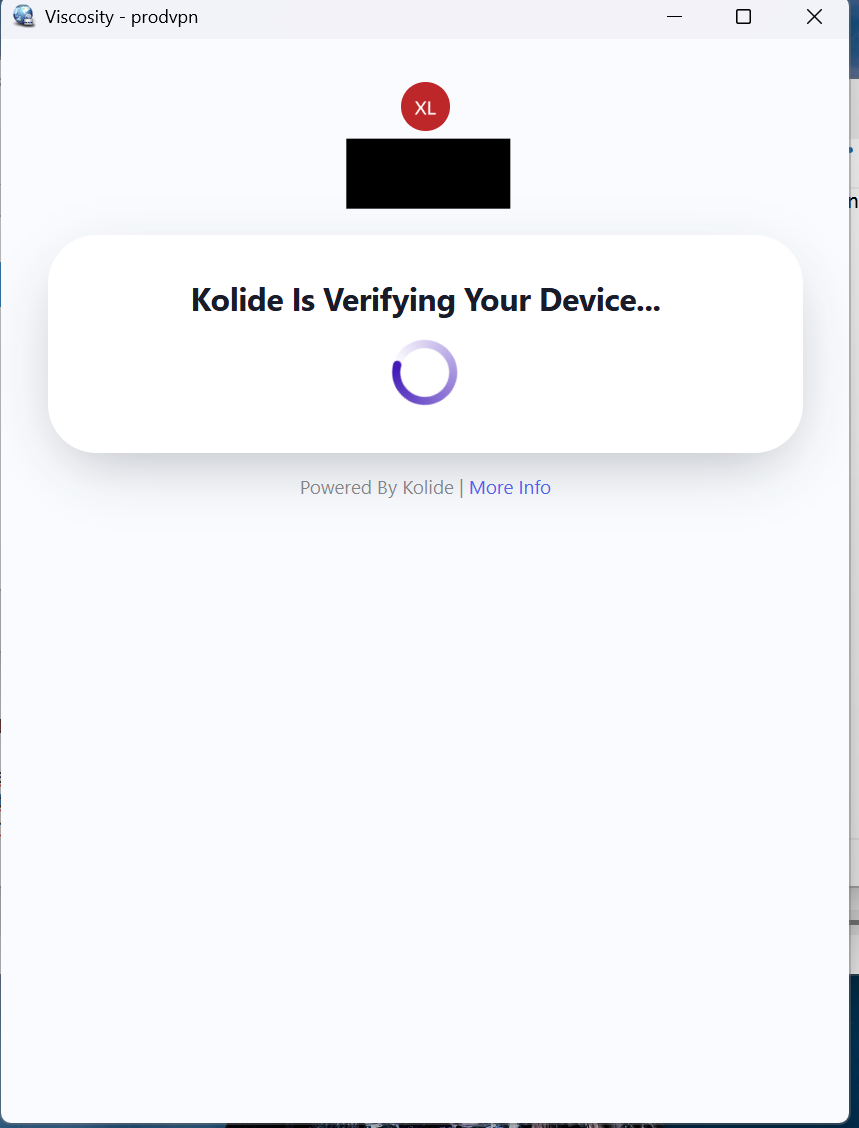
Here are my viscosity logs:

Jul 16 5:12:20 PM: State changed to Connecting
Jul 16 5:12:20 PM: Viscosity Windows 1.13 (1877)
Jul 16 5:12:21 PM: Running on Microsoft Windows 11 Pro 64 bit
Jul 16 5:12:21 PM: Running on .NET Framework Version 4.8.09221.533509
Jul 16 5:12:21 PM: Checking reachability status of connection...
Jul 16 5:12:21 PM: Connection is reachable. Starting connection attempt.
Jul 16 5:12:21 PM: Interface Type: ViscTunTap
Jul 16 5:12:21 PM: No associated network adapter was found, creating one. This process may take up to a minute or two.
Jul 16 5:12:21 PM: Current Parameter Settings:
Jul 16 5:12:21 PM:   config = 'stdin'
Jul 16 5:12:21 PM:   mode = 0
Jul 16 5:12:21 PM:   show_ciphers = DISABLED
Jul 16 5:12:21 PM:   show_digests = DISABLED
Jul 16 5:12:21 PM:   show_engines = DISABLED
Jul 16 5:12:21 PM:   genkey = DISABLED
Jul 16 5:12:21 PM:   genkey_filename = '[UNDEF]'
Jul 16 5:12:21 PM:   key_pass_file = '[UNDEF]'
Jul 16 5:12:21 PM:   show_tls_ciphers = DISABLED
Jul 16 5:12:21 PM:   connect_retry_max = 1
Jul 16 5:12:21 PM: Connection profiles [0]:
Jul 16 5:12:21 PM:   proto = udp
Jul 16 5:12:21 PM:   local = '[UNDEF]'
Jul 16 5:12:21 PM:   local_port = '[UNDEF]'
Jul 16 5:12:21 PM:   remote = 'vpn.example.com'
Jul 16 5:12:21 PM:   remote_port = '1194'
Jul 16 5:12:21 PM:   remote_float = DISABLED
Jul 16 5:12:21 PM:   bind_defined = DISABLED
Jul 16 5:12:21 PM:   bind_local = DISABLED
Jul 16 5:12:21 PM:   bind_ipv6_only = DISABLED
Jul 16 5:12:21 PM:   connect_retry_seconds = 1
Jul 16 5:12:21 PM:   connect_timeout = 120
Jul 16 5:12:21 PM:   socks_proxy_server = '[UNDEF]'
Jul 16 5:12:21 PM:   socks_proxy_port = '[UNDEF]'
Jul 16 5:12:21 PM:   tun_mtu = 1350
Jul 16 5:12:21 PM:   tun_mtu_defined = ENABLED
Jul 16 5:12:21 PM:   link_mtu = 1500
Jul 16 5:12:21 PM:   link_mtu_defined = DISABLED
Jul 16 5:12:21 PM:   tun_mtu_extra = 0
Jul 16 5:12:21 PM:   tun_mtu_extra_defined = DISABLED
Jul 16 5:12:21 PM:   tls_mtu = 1250
Jul 16 5:12:21 PM:   mtu_discover_type = -1
Jul 16 5:12:21 PM: NOTE: --mute triggered...
Jul 16 5:12:21 PM: 252 variation(s) on previous 100 message(s) suppressed by --mute
Jul 16 5:12:21 PM: OpenVPN 2.6.21 Windows [SSL (OpenSSL)] [LZO] [LZ4] [AEAD]
Jul 16 5:12:21 PM: library versions: OpenSSL 3.5.7 9 Jun 2026, LZO 2.10
Jul 16 5:12:21 PM: Resolving address: "vpn.example.com"
Jul 16 5:12:22 PM: Valid endpoint found: vpn.example.com:1194:udp
Jul 16 5:12:22 PM: Outgoing Control Channel Authentication: Using 160 bit message hash 'SHA1' for HMAC authentication
Jul 16 5:12:22 PM: Incoming Control Channel Authentication: Using 160 bit message hash 'SHA1' for HMAC authentication
Jul 16 5:12:22 PM: Control Channel MTU parms [ mss_fix:0 max_frag:0 tun_mtu:1250 tun_max_mtu:0 headroom:126 payload:1600 tailroom:126 ET:0 ]
Jul 16 5:12:22 PM: Data Channel MTU parms [ mss_fix:0 max_frag:0 tun_mtu:1350 tun_max_mtu:1600 headroom:136 payload:1768 tailroom:562 ET:0 ]
Jul 16 5:12:22 PM: TCP/UDP: Preserving recently used remote address: [AF_INET]203.0.113.10:1194
Jul 16 5:12:22 PM: Socket Buffers: R=[65536->65536] S=[65536->65536]
Jul 16 5:12:22 PM: UDPv4 link local: (not bound)
Jul 16 5:12:22 PM: UDPv4 link remote: [AF_INET]203.0.113.10:1194
Jul 16 5:12:22 PM: State changed to Authenticating
Jul 16 5:12:22 PM: TLS: Initial packet from [AF_INET]203.0.113.10:1194, sid=00000000 00000000
Jul 16 5:12:22 PM: VERIFY OK: depth=4, C=US, O=Internet Security Research Group, CN=ISRG Root X1
Jul 16 5:12:22 PM: VERIFY OK: depth=3, C=US, O=Internet Security Research Group, CN=ISRG Root X2
Jul 16 5:12:22 PM: VERIFY OK: depth=2, C=US, O=ISRG, CN=Root YE
Jul 16 5:12:22 PM: VERIFY OK: depth=1, C=US, O=Let's Encrypt, CN=YE2
Jul 16 5:12:22 PM: VERIFY KU OK
Jul 16 5:12:22 PM: Validating certificate extended key usage
Jul 16 5:12:22 PM: ++ Certificate has EKU (str) TLS Web Server Authentication, expects TLS Web Server Authentication
Jul 16 5:12:22 PM: VERIFY EKU OK
Jul 16 5:12:22 PM: VERIFY X509NAME OK: CN=vpn.example.com
Jul 16 5:12:22 PM: VERIFY OK: depth=0, CN=vpn.example.com
Jul 16 5:12:22 PM: Control Channel: TLSv1.3, cipher TLSv1.3 TLS_AES_256_GCM_SHA384, peer certificate: 256 bits ECprime256v1, signature: ecdsa-with-SHA384, peer temporary key: 253 bits X25519
Jul 16 5:12:22 PM: [vpn.example.com] Peer Connection Initiated with [AF_INET]203.0.113.10:1194
Jul 16 5:12:22 PM: TLS: move_session: dest=TM_ACTIVE src=TM_INITIAL reinit_src=1
Jul 16 5:12:22 PM: TLS: tls_multi_process: initial untrusted session promoted to trusted
Jul 16 5:12:22 PM: State changed to Connecting
Jul 16 5:12:22 PM: SENT CONTROL [vpn.example.com]: 'PUSH_REQUEST' (status=1)
Jul 16 5:12:22 PM: State changed to Authenticating
Jul 16 5:12:22 PM: AUTH_PENDING received, extending handshake timeout from 60s to 60s
Jul 16 5:12:22 PM: URL authentication request received from server. Attempting to load URL...
Jul 16 5:12:22 PM: Info command was pushed by server ('WEB_AUTH::https://vpn.example.com:443/oauth2/start?state=REDACTED')
Jul 16 5:12:23 PM: SENT CONTROL [vpn.example.com]: 'PUSH_REQUEST' (status=1)
Jul 16 5:12:24 PM: Authentication URL successfully loaded.
Jul 16 5:12:24 PM: SENT CONTROL [vpn.example.com]: 'PUSH_REQUEST' (status=1)
..... goes on for a while
Jul 16 5:12:56 PM: SENT CONTROL [vpn.example.com]: 'PUSH_REQUEST' (status=1)
Jul 16 5:12:57 PM: NOTE: --mute triggered...
Jul 16 5:13:23 PM: 22 variation(s) on previous 100 message(s) suppressed by --mute
Jul 16 5:13:23 PM: No reply from server to push requests in 61s
Jul 16 5:13:23 PM: TCP/UDP: Closing socket
Jul 16 5:13:23 PM: SIGUSR1[soft,no-push-reply] received, process restarting
Jul 16 5:13:23 PM: State changed to Connecting
Jul 16 5:13:23 PM: Restart pause, 1 second(s)
..... restarts another loop

A little bit more context on Kolide:

Kolide’s agent runs a local HTTP server on 127.0.0.1 on a high-numbered port. The Okta login page loaded in Viscosity’s WebView window makes requests to that loopback address to perform device authentication.

Additionally, do we expect windows viscosity to be able open the login page in an external browser soon? This feature has been available in mac for a while now.

Thank you very much!

Hi lix98755,

Viscosity 1.13 hasn’t made any changes regarding how its web authentication works, so I think it’s likely one of the following:

  1. Third-party firewall/endpoint security software is blocking the localhost connection. Generally such software works on file hashes (rather than product names), and so when the software updates it sees it as a new program. You may need to add Viscosity to an allow/white list in any such software.
  2. Your authentication backend may be doing some kind of browser fingerprinting, and it may be getting caught up on the updated User Agent. Viscosity includes its version details in the User Agent header (e.g. Viscosity/1.13.1.1880) alongside the standard Edge/Chrome User Agent. If your authentication backend had previously allow/white-listed Viscosity 1.12.1’s User Agent (such as it manually being added, or perhaps self-learned), it may see the User Agent with a different version number as a completely different browser and be blocking further progress.
  3. Edge/Chrome (which WebView2 uses behind the scenes) recently introduced Local Network Access (LNA) permission support, which is designed to prompt the user if a webpage tries to access a service on localhost or the local network (and by default block access). However, Viscosity does not enable this on the web view. While this behaviour can be overridden in the registry, users should be seeing an Allow/Block prompt if this was the case.

According to Kolide’s documentation, it supports debug logging, which will log connections to its localhost service. This sounds like a good place to start to see whether the web authentication page is able to communicate with the localhost service, or whether communication with localhost is being blocked.

I’m afraid we don’t have a Kolide environment to test with, but if you’d like for us to take a closer look for you and you are able to provide a test/dummy account (preferably firewalled out from any actual network access), please send an email to our support email address and we’ll take a look.

Cheers,
James

While we are debugging this, is it possible to downgrade it to 1.12 from 1.13?

Yes, legacy versions can be found at the Legacy Downloads page.

Cheers,
James

That’s incredibly helpful and thanks for the quick response!

After downgrading to 1.12.1, it works again with no other changes made to the system. In my opinion, it confirms the regression is specific to Viscosity 1.13 on windows.

We’ve also ruled out 1 and 2 on our end. For 3, we tried adding registry allowlist entries for https://auth.kolide.com and https://*.kolide.com under both WebView2 and Edge policy paths. No change in behavior. Additionally, Kolide debug logs confirm the localhost challenge succeeds on every attempt regardless.

We compared Kolide logs for 1.12.1 (as an example of success) and 1.13 (as an example of failure) and found Kolide agent behavior is identical in both 1.12.1 and 1.13. The device challenge completes successfully every time:

  • origin matches allowlist ✓
  • successful challenge, proxying ✓
  • /v1/cmd GET 200 ✓
  • sent callback 204 No Content ✓

We see some difference is on the Viscosity side:

1.12.1 (working):

  • AUTH_PENDING received
  • Webview loads auth URL
  • Kolide completes device check (~15 seconds)
  • PUSH_REPLY received from VPN server → connected

1.13 (broken):

  • AUTH_PENDING received
  • Webview loads auth URL
  • Kolide completes device check (~4 seconds)
  • PUSH_REPLY never arrives → timeout after 60s

The VPN server is also ruled out since our Mac users on the same server are unaffected.

One suspicion we have is that after Kolide verifies the device and Okta’s authentication policy succeeds, Okta completes the OAuth2/OIDC authorization flow by redirecting the embedded browser back to the VPN server’s registered OAuth2 redirect URI. The VPN server validates the authorization response, associates it with the pending VPN authentication, and resumes the OpenVPN session by sending a PUSH_REPLY to the client. In 1.12.1 this redirect completes successfully. In 1.13, we suspect that it silently fails, possibly related to the the webview, leaving OpenVPN waiting indefinitely and timeout eventually.

Let me know what you think. Thanks for looking into this regardless!

We did a little bit more digging with Wireshark and claude, here’s what we found with v1.12 and v1.13 with TLS SNI, relevant domains only:

1.12.1 (working):
  10:05:34  vpnserver.com          ← VPN initial connection
  10:05:34  mycompany.okta.com     ← Okta starts
  10:05:35  login.okta.com         ← Okta login
  10:05:37  auth.kolide.com        ← Kolide device check
  10:05:38  auth.kolide.com
  10:05:38  auth.kolide.com
  10:05:39  auth.kolide.com
  10:05:47  mycompany.okta.com     ← redirect back to Okta ✓
  10:05:48  vpnserver.com          ← redirect back to VPN ✓ → PUSH_REPLY received → connected

1.13 (broken):
  10:16:35  vpnserver.com          ← VPN initial connection
  10:16:36  mycompany.okta.com     ← Okta starts
  10:16:36  login.okta.com         ← Okta login
  10:16:37  mycompany.okta.com
  10:16:38  auth.kolide.com        ← Kolide device check
  10:16:39  auth.kolide.com
  10:16:40  auth.kolide.com
  10:16:42  auth.kolide.com
  (nothing)                        ← mycompany.okta.com never appears again ✗
  (nothing)                        ← vpnserver.com never appears again ✗
  → PUSH_REPLY never received → timeout after 60s

After Kolide completes device verification in 1.13, the webview never makes the redirect back to mycompany.okta.com. In 1.12.1 this redirect happens ~8 seconds after the last Kolide connection and completes the OAuth2 flow. In 1.13 it never happens, leaving OpenVPN waiting indefinitely.

Kolide agent behavior is identical in both versions, the device challenge completes successfully every time.

Let me know if this is not sufficient, we can look into setting up test accounts. Thank you very much!

Hi lix98755,

Microsoft did release an updated version of the WebView2 runtime around the same time as the Viscosity 1.13 update. However I think you can rule this out as a cause as you mention downgrading Viscosity helps (the installed runtime version wouldn’t change).

We’ve also performed some testing of communicating with a web service running on localhost, and didn’t encounter any issues. So I think that coupled with your log findings rules out a communication issue between the web page and the local authentication service. At this point I’m still inclined to think it must be some sort of browser fingerprinting or Javascript failure.

If you haven’t already done so, I recommend reaching out to Kolide’s support staff and see if they’re able to offer any insight. As we’re not familiar with their product (and they have no test/developer version available) sadly there isn’t much further we can suggest or test from our end.

As I mentioned earlier, we’re happy to take a closer look for you if you’re able to privately provide a test/dummy account. If you’re able to setup such an account, please send along the details to us via email and we’ll pull the process apart and see where it’s getting stuck.

Cheers,
James