Beta versions of Viscosity (if available) can be easily installed like so:
Open Viscosity’s Preferences window and click on the General toolbar icon
Tick the “Include beta versions” checkbox
Click the Check Now button to see if a beta update is available
Please note that beta builds are made available for testing only. They often contain experimental code and should not be used in a production environment. If you run into any bugs, or have any comments regarding the latest build, please feel free to post them here.
Build Notice: Viscosity for Windows 1.3.3b3 Now Available
You can subscribe to this topic by clicking on the “Subscribe topic” link at the bottom of the page to receive email notifications of new beta versions.
Build Notice: Viscosity for Windows 1.3.4b1 Now Available
You can subscribe to this topic by clicking on the “Subscribe topic” link at the bottom of the page to receive email notifications of new beta versions.
Build Notice: Viscosity for Windows 1.3.4b2 Now Available
You can subscribe to this topic by clicking on the “Subscribe topic” link at the bottom of the page to receive email notifications of new beta versions.
Build Notice: Viscosity for Windows 1.3.6b1 Now Available
You can subscribe to this topic by clicking on the “Subscribe topic” link at the bottom of the page to receive email notifications of new beta versions.
Build Notice: Viscosity for Windows 1.4.0b1 Now Available
You can subscribe to this topic by clicking on the “Subscribe topic” link at the bottom of the page to receive email notifications of new beta versions.
Build Notice: Viscosity for Windows 1.4.0b2 Now Available
You can subscribe to this topic by clicking on the “Subscribe topic” link at the bottom of the page to receive email notifications of new beta versions.
Build Notice: Viscosity for Windows 1.4.0b3 Now Available
You can subscribe to this topic by clicking on the “Subscribe topic” link at the bottom of the page to receive email notifications of new beta versions.
Thanks for the feedback! Does this only happen using OpenVPN 2.3 or does this happen using OpenVPN2.2 as well? (The version will display in the log when you connect).
Build Notice: Viscosity for Windows 1.4.0b4 Now Available
You can subscribe to this topic by clicking on the “Subscribe topic” link at the bottom of the page to receive email notifications of new beta versions.
Thanks for the reply. We’ve had a close look and it should be just OpenVPN 2.3 that had the problem and we’ve updated the included msvc dll’s accordingly. Thanks again for the bug report!
Build Notice: Viscosity for Windows 1.4b5 Now Available
You can subscribe to this topic by clicking on the “Subscribe topic” link at the bottom of the page to receive email notifications of new beta versions.
Build Notice: Viscosity for Windows 1.4b6 Now Available
You can subscribe to this topic by clicking on the “Subscribe topic” link at the bottom of the page to receive email notifications of new beta versions.
Build Notice: Viscosity for Windows 1.4b7 Now Available
You can subscribe to this topic by clicking on the “Subscribe topic” link at the bottom of the page to receive email notifications of new beta versions.
Build Notice: Viscosity for Windows 1.4.2b1 Now Available
You can subscribe to this topic by clicking on the “Subscribe topic” link at the bottom of the page to receive email notifications of new beta versions.
Build Notice: Viscosity for Windows 1.4.2b2 Now Available
You can subscribe to this topic by clicking on the “Subscribe topic” link at the bottom of the page to receive email notifications of new beta versions.
Build Notice: Viscosity for Windows 1.4.3b1 Now Available
You can subscribe to this topic by clicking on the “Subscribe topic” link at the bottom of the page to receive email notifications of new beta versions.
I hope this is the right thread to post in, apologies if it isn’t!
Quick feedback for the latest beta 1.4.3b1:
German Translation:
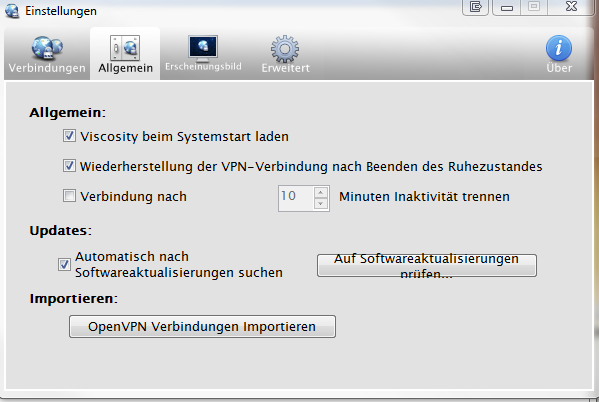
Within the main “settings” → “general” window, the new German translation for “Check for Updates” is “too long” for the button (see attached screenshot) and thus looks very weird. I suggest either changing the size (which would have to be done for all other languages too and might be “inconvenient”) or switching back to the phrase “Auf Updates prüfen…”, since “Update” is an “established” word in the German language too.
When editing a connection, the second tab “Authentifizierung” is too small for its content too. Not 100% sure this wasn’t there before the new beta though.
The log-entries generated by Viscosity lack German translation at some parts. Here are a few I’ve found:
“State changed to Connecting” = “Status auf “Verbinden” geändert”
“Running on XXX” = “Ausgeführt auf XXX” (not 100% sure about this one, best translation I could find)
“Bringing up interface…” = “Aktiveren des Interfaces” or “Aktivieren des Netzwerkadapters” (second one says “Bringing up network adapter”)
“Initialization Sequence Completed” = “Initialisierungssequenz abgeschlossen”
“State changed to Connected” = “Status auf “Verbunden” geändert”
A few others are missing since I didn’t see them at the moment. Will post them once I find them, if you want additional help with translations, feel free to send me a message, I’d be glad to help out.
General feedback:
Connecting on startup seems to be working a bit better, although it still fails sometimes on my laptop (since my Win7 laptop takes ages to boot and establish a network connection, Viscostiy often tries to connect before the wifi connections has been started). I’d figure a changeable “startup-delay” or a configurable “retry connectivity check X times after Y seconds” setting would be a desirable way to solve this
I have not found those two points from the changelog:
Editing can now be locked down to require Administrator rights
Global preferences can now be set
Did I oversee them or can anyone point me to those settings or explain them in a bit more detail? I guess the first one allows you to disallow all non-admin users to mess with your VPN-connections and the second one can be used to set preferences like DNS for all connections?
Thank you for being interested in keeping up with the latest news from us! Please double-check your email address below and then click the Subscribe button.