When signing in to a VPN server using SAML, it would be nice if Viscosity used the browser instead of WebView. Most of our users already have an active session with the Idp, so utilizing that session rather than creating a new one in WebView for Viscosity would be an improvement to the user experience.
At the very least, make it an option in Preferences for users to select if the wish.
I would also be interested in this feature. We are currently switching the Auth method for our VPN to SSO and due to the web view I have to login again and 1Password is not working inside the webvivew, so I have to copy my password over to the web view. This way using OpenVPN Connect is just a lot faster as it is just a click if I am already authenticated in the browser.
I would also be interested in this feature. I nearly always already have an active SSO session for other items and having to do it separately just for Viscosity is a large annoyance.
We have another use-case for having Viscosity support spawning an external browser rather than its internal WebView: we are trying to implement 2FA through Okta for our VPN, and it is currently incompatible with Viscosity’s web view because our Okta setup requires the use of Yubikeys or other hardware keys, which we can’t currently configure to work with Viscosity’s web view (but obviously work just fine with standalone Chrome instances). We’re currently debating migrating back to the stock OpenVPN client solely because it has this capability and Viscosity does not.
+1 this. We currently use MFA + device compliant checks with the IDP. Viscosity + Webview is not passing through the DeviceID to the IDP so the IDP thinks the request is coming from a new device. It would be better if we could just use the default system browser (in my case Edge).
Another +1. Enabling a setting to allow Viscosity to use the default browser, specifically on MacOS in my case, would allow us to use Entra ID’s conditional access policies for our SAML flow. Currently Entra cannot check things like device compliance as the app’s auth web view is not conditional access capable. If it used the default browser this check would work correctly.
Another +1 for this feature request., although this thread has been quiet for a while. Any updates on this?
We have a similar use case where we are trying to set up Okta OIDC integration with Viscosity and Okta MFA. Right now, Viscosity does not work with okta verify or security keys (like yubikeys, passkeys, etc). With WebView, Okta verify leads to an infinite loop and the security keys option just errors out. Additionally, if we can open sso auth in browser, users who have active Okta sessions will not be asked to log in again.
+1 since the current WebView solution breaks authentication with Passkeys or FIDO2 tokens. This works well with all major browsers and other VPN clients. It would be a shame if Viscosity would not support the latest and arguably greatest available authentication mechanisms.
The latest macOS beta version of Viscosity (1.12b1 at the time of writing) now supports web authentication taking place in the default web browser. This should make it easier to authenticate in situations where an associated domain cannot be set, but it does mean that Viscosity cannot perform further validation of the site being loaded. Information on how to update to the latest beta version can be found at: https://www.sparklabs.com/support/kb/article/using-viscosity-beta-versions/
For enterprise machines, setting an “associated domain” via MDM is still the recommended approach. This enables the use of WebAuthn (aka FIDO2 or Passkeys) authentication without the need for an external browser, however the associated domain must match that of both the domain being used for the WebAuthn Relaying Party ID, as well as for the website making the request (it’s possible to have multiple associated domains).
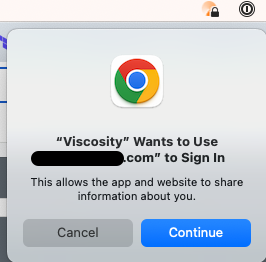
in the configuration file to make it use the default browser (Chrome). However, we noticed that every time when Viscosity tries to open the webauthn url in Chrome, we’d see this popup
Is it possible either force it to continue or remember my choice on mac so that I don’t need to click on continue every time? This is very important for people who disconnect and reconnect to the VPN often.
I’m afraid this prompt is coming from macOS itself, rather than from Viscosity. As far as we’re aware there are only two ways to prevent it:
Have ephemeral (aka private) web authentication set to true (which is the default in the current beta version, although we’re still considering what the best default option is here). macOS will not display the prompt if this is the case, however it means any existing browser cookies/sessions will not be shared with the web authentication prompt.
Set an “associated domain” for Viscosity (the domain being used for web authentication). macOS should not display the prompt if the domains being used match. This is only possible on MDM managed computers. It’s worth noting that if an associated domain is set, then Viscosity’s internal web view will also work fine for WebAuthn, shared credentials, persistent sessions, etc., and will typically offer better integration that using an external browser. Sadly associated domains are not end-user configurable in macOS though. https://support.apple.com/en-au/guide/deployment/dep76bf64513/web
We haven’t looked at the latest macOS 26 (Tahoe) beta yet to see whether anything has changed in this regard, however I highly recommend sending a quick feedback to Apple saying you’d like to see an option to suppress the alert each time. https://www.apple.com/feedback/macos/
Finally, from a VPN standpoint, you may like to consider enabling session tokens on the OpenVPN server to prevent the need for re-authentication prompts. Viscosity will use a session token for authentication when available, which will avoid the need for the user to re-authenticate for common scenarios (such as dropouts, short reconnects, or reconnecting after sleeping their computer). See the OpenVPN man page for the server-side “auth-gen-token” command for more information.
It isn’t something that’s currently available with the Windows beta version of Viscosity, but we’ll likely be adding it to version 1.12 for Windows (or possibly a 1.12.1 update).
There hasn’t been as much demand for it on Windows (as Windows does not restrict web and plugin functionality like macOS does with web views), and I believe the callbacks are a little tricker to handle on Windows if there are multiple VPN clients installed, but it’s being worked on
Happy to hear that it’s being worked on. While it’s less restricted with Windows, Windows webviews doesn’t persist the session info (at least not during my testing). Users always need to authenticate whenever they connect to the VPN regardless of our SSO authentication policy so it would be nice to have the browser option to be able to share the session info.
SparkLabs Newsletter
Thank you for being interested in keeping up with the latest news from us! Please double-check your email address below and then click the Subscribe button.