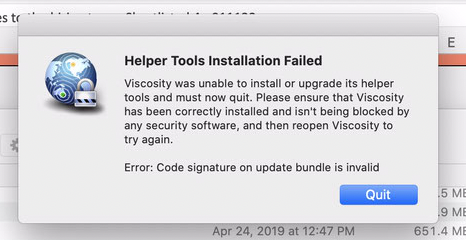
"Helper Tools Installation Failed
Viscosity was unable to install or upgrade its helper tools and must now quit. Please ensure that Viscosity has been correctly installed and isn’t being blocked by any security software, and then reopen Viscosity to try again.
Error: Code signature on update bundle is invalid"
I keep getting this error on Monterey.
Viscosity worked fine in Big Sur but as soon as I updated to Monterey, I started getting this error. Updating to beta version 1.10.1 b3 of Viscosity solved the issue.
Now I got an update to 1.10.1 and the issue is back. I have tried everything. Reinstalling, deleting helper tool etc.
Viscosity 1.10.1 now alerts you if the helper tools could not be updated, and the reason why. Helper tools consist of things like the OpenVPN binaries. Older versions of Viscosity would ignore a helper tools update failure and just attempt to run with the existing older tools. However that means things like OpenVPN (and its associated OpenSSL libraries) were not getting updated, which could potentially lead to security issues down the track.
In your case the helper tools are failing to install because the “Code signature on update bundle is invalid”. This means that the Viscosity application has been modified in some way that has broken its code signature. It’s likely the helper tools were failing to update with previous versions of Viscosity as well, however you were not aware this was the case as Viscosity wasn’t alerting you.
The most common cause we see for an unexpected broken code signature is copying the Viscosity application using an incorrect terminal command. For example, if copying Viscosity using “cp”, make sure you’re using “cp -R” and not “cp -r” as the behaviour of these differ, with the latter not preserving the extended attributes on the files or the symlink structure of frameworks. These changes cause the code signature on applications to break. Try downloading a fresh copy of Viscosity from our website and copy it into place using click-and-drag: https://www.sparklabs.com/viscosity/download/
Please also ensure that any security, antivirus, or similar software is not attempting to modify Viscosity. Some enterprise end point security software may inadvertently modify an application, which can also cause the code signature to break. Often whitelisting Viscosity in these applications can help.
You can test the code signature on the Viscosity application by entering the command
codesign -vvvv /Applications/Viscosity.app
into the Terminal and pressing Return/Enter. If the code signature is valid you should see something like “Viscosity.app: valid on disk” near the end. If it’s invalid you’ll receive a different message with more information.
Running this command “codesign -vvvv /Applications/Viscosity.app” returns
/Applications/Viscosity.app: valid on disk
/Applications/Viscosity.app: satisfies its Designated Requirement
I have downloaded the file from your website and transferred into ‘Application’ by click and drag in DMG. Same error.
Installing with brew also gives same error.
The strangest thing happened. I opened the Viscosity app from inside the DMG file and installed the helper. It worked fine. Transferred the app to /Applications after that and it is still working.
Version 1.10 does not have this check in place, it’s not possible for it to display the same error message. I recommend checking that the correct version of Viscosity is being run. If you have multiple copies installed perhaps the wrong copy is being run, and that’s why nothing seems to be making a difference.
The strangest thing happened. I opened the Viscosity app from inside the DMG file and installed the helper. It worked fine.
Glad to hear you got it working. Perhaps there is a problem with the file system on your drive (if this is a “hackintosh” there may be something wrong with the APFS driver being used). Or as above, perhaps the wrong version of Viscosity was being run previously (for example, maybe you’re copying it to your global Applications folder, but then running a different copy from an Applications folder in your User directory).
I’m seeing a similar issue when I push Viscosity updates from our MDM (Addigy) using a PKG built from the SparkLabs templates. If Viscosity is already installed/running, the pkg installs OK but presents the helper tools code signature error upon start.
Deleting the .app and re-running the installer from MDM results in a working install. Given that the pkg itself seems OK, I’m not sure what’s going wrong. I could do a manual
rm -rf /Applications/Viscosity.app
as part of the pre-install script but that seems clunky.
This indicates that the included version of the Viscosity app bundle is corrupt and the code signature on it broken. It’s happening when upgrading (rather than a fresh install) and the existing copy of Viscosity’s helper is checking the validity of the upgraded package. The error message should include a specific reason for the failure.
Is that method deprecated now? Would it make more sense to have a bundle without the .app (settings/license only) and to push the .app out separately?
The specific error I’m getting is attached, but with limited detail beyond broken code signature. I’ve checked the .app that’s packaged, and the code signature appears valid:
/Users/work/Viscosity - Client/Viscosity/Viscosity.app: accepted
source=Notarized Developer ID
The bundling method will still work fine with modern versions of macOS. In this instance I’d say something is modifying the Viscosity app bundle prior to it being included in the installer.
Fantastic, that helped narrow down the issue. Thank you!
I store all my project files on OneDrive, which apparently modifies files as part of the sync. What a nuisance.
A fresh copy from my /Applications folder passed, but as soon as it was put into OneDrive it would fail.
Viscosity.app: resource fork, Finder information, or similar detritus not allowed
In subcomponent: /Users/work/Library/CloudStorage/OneDrive/Packages Projects/Viscosity/Viscosity/Viscosity.app/Contents/Frameworks/Sparkle.framework
Unfortunately, this has come up again with our users only when installing an updated version of Viscosity.
It seems something is happening to the .app between when it’s packaged in the PKG and when it’s executed on the system.
If I extract the .app from the .pkg with Pacifist, it passes just fine. If I install it with our MDM tool (Addigy), it then fails the codesign and the user gets the error message (and we get a ticket).
Ostensibly, all that’s being run against the PKG file is:
/usr/sbin/installer -pkg “/Library/Addigy/ansible/packages/Viscosity (1.10.1)/Viscosity_Installer_CLIENT_1.10.1.pkg” -target /
I’m not sure why there would be any difference between an update and a clean installation though.
SparkLabs Newsletter
Thank you for being interested in keeping up with the latest news from us! Please double-check your email address below and then click the Subscribe button.