Make the Icon in the system try show clear red/green/amber status. It looks like there might be a few pixels that do show something already, but you can’t see them enough to know if you have a connection status. Make the icon show this connection clearly.
Hi CSM,
If you are having problems seeing the default Windows system tray icons, please take a look at a different icon set in Preferences → Appearance. The Windows World and Leopard Colored are very easy to see the status at a glance.
Regards,
Eric
Hi, I would very much like to use a clearer set of icons, like this set, which is far, far better than the default:
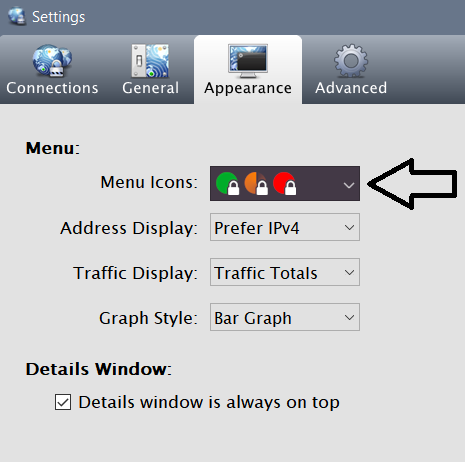
My problem is that the setting does not “stick”. It’s just never saved, and I have to configure it every single time, and this is annoying.
Where is the setting being stored, please? Could it be a registry key or file that’s locked, and it can’t save? My company doesn’t allow me admin rights, and Viscosity is installed via Intune. Everything else appears to work.
Hi mph,
It sounds probable that your IT administrator is forcing the menu icon setting to a particular value. There are a number of ways an admin could do this, such as via Viscosity’s GlobalSettings.xml file, via GPO Group Policy, or via MDM settings management. I’m afraid only your IT admin would be able to change this: I recommend reaching out to them.
Further information about GlobalSettings.xml:
https://www.sparklabs.com/support/kb/article/bundling-viscosity-with-vpn-connections-preferences-windows/#global-settings
Further information about GPO Group Policy:
https://www.sparklabs.com/support/kb/article/deploy-viscosity-windows-under-a-gpo-group-policy-environment/
Regards,
Aaron
Thanks. Yes, I have now found a global settings file which is overriding every single setting of my own.
