Disconnected:
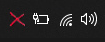
Connecting Animation:

Connected:

- Turn off Viscosity
- Download the .zip extract the folder and replace in [ C:\Program Files\Viscosity\Resources\Menu Icons ]
or whatever path your viscosity is saved in - Select the default Blue Appearances in Viscosity settings.
Default Blue.ViscosityMenuIcons.zip (85.3 KB)
